
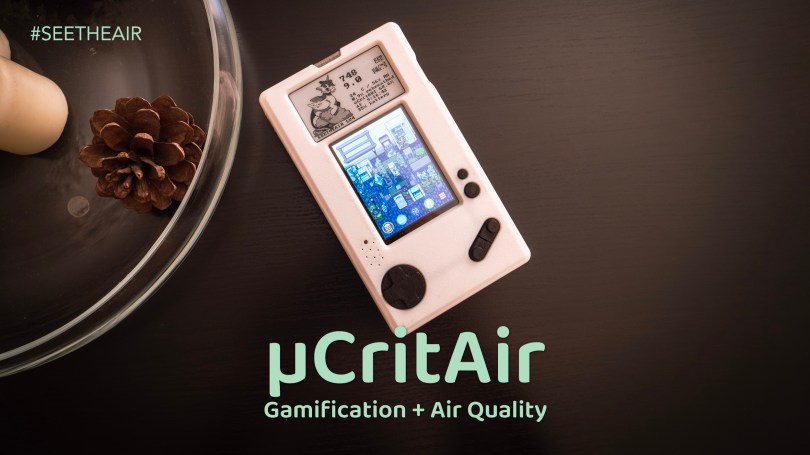
For years, I’ve been advocating for the integration of gamification into everyday tools to drive meaningful behavioral change, especially concerning something as vital yet often invisible as indoor air quality. We need engaging ways to keep people motivated to understand and improve their environments. So, when I encountered the µCritAir (it actually found me), I was immediately intrigued. This isn’t just another air quality monitor; it’s an experiment in engagement, using a digital pet – a µCritter – whose health depends directly on the air you breathe. Keep your air clean, and your critter thrives. Let it worsen, and its health suffers. It’s a compelling, tangible connection between data and consequence.
Development Kit
It’s important to set expectations correctly: the µCritAir is currently available as a Development Kit. This isn’t a polished, mass-market product yet. Instead, it’s aimed squarely at enthusiasts, early adopters, and tinkerers who enjoy being part of the development journey. Yes, this means you’ll encounter some unpolished aspects, perhaps a bug here or there, or features still under active development. However, this is also its strength for the right audience. The team behind µCritAir is clearly passionate and actively working on both software and hardware improvements. They genuinely value the feedback from their early users, creating a collaborative dynamic that’s exciting to be a part of.
For anyone interested in the technical specifications, features, and the team’s vision, I strongly recommend visiting their comprehensive website at https://www.ucritter.com/. Furthermore, the documentation available at https://docs.ucritter.com/ is invaluable for understanding the device’s capabilities and setup.
Design
From a physical perspective, the µCritAir Dev Kit feels comfortable to hold in its current iteration. The ergonomics are generally good. However, one small area for potential refinement is the plastic bezel surrounding the colour screen. I found that the raised edge can make it slightly difficult to accurately select coins, objects, or menu options located right at the periphery of the display, particularly if you have larger fingers. A slightly lower profile or differently bevelled edge might improve this interaction.
Early Version
An interesting interaction quirk I observed relates directly to the gamification aspect. When you pick up the device to interact with your µCritter – feeding it, playing, checking its status – you naturally bring it closer to your face. This action inevitably causes a temporary spike in the measured CO2 levels due to exhaled breath. While interacting, which usually lasts between 2 to 5 minutes, these elevated readings don’t accurately reflect the room’s ambient air quality. A potential software enhancement could be to automatically pause sensor readings during these interactive periods. Perhaps the onboard accelerometer could detect the distinct motion of picking up and holding the device close, triggering a temporary measurement pause until the device is set down again. Finally, a little green LED that signals a completed measurement can bother some, especially when its nighttime blinking catches your eye if the device is near your bed. The brightness adjustment doesn’t seem to eliminate the issue. A simple fix would be a programmable option to turn off that LED during the night.
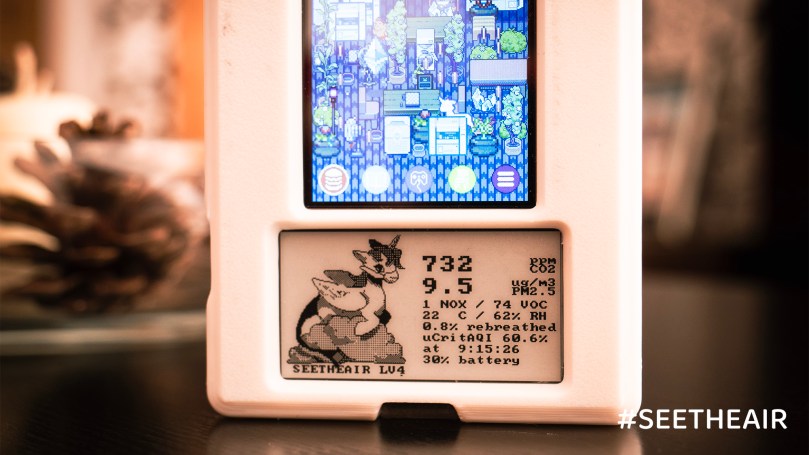
On the performance front, the battery life is currently excellent. It easily lasts through extended monitoring periods. The team has mentioned the possibility of further extending this by potentially allowing users to disable the Volatile Organic Compounds (VOC) and Nitrogen Oxides (NOX) sensing capabilities of the integrated Sensirion sensor. This raises a valid question: is there significant value in monitoring these specific metrics for the average home user, especially weighed against potentially longer battery life? Personally, while VOC and NOX data can be informative in specific situations (e.g., after painting, cooking, or near high traffic), for general day-to-day indoor air quality awareness focused on ventilation and occupancy (CO2), temperature, and humidity, I don’t feel they are essential for this particular device’s core gamified purpose. Prioritizing. PM2.5, CO2, temperature, and humidity seems sufficient to keep the µCritter alive and encourage the primary desired behaviour – ensuring good ventilation.
Cool Features
Beyond its core gamified approach to air quality, the µCritAir packs several genuinely cool features that enhance its utility. One standout is the Rebreathe Percentage calculation. This metric estimates the proportion of air you inhale that consists of recently exhaled air, primarily from yourself or others in the same space. The device calculates this by measuring the ambient CO2 concentration and comparing it to the baseline CO2 level of fresh outdoor air (around 420 ppm), using the elevated CO2 as a proxy for rebreathed air – a higher CO2 level indoors implies a higher percentage of air that has already been cycled through someone’s lungs. For users who want to dive deeper into their data, the µCritAir includes a microSD card slot, enabling the logging of all sensor measurements over time. This is fantastic for creating personal backups or exporting the data for detailed analysis and tracking long-term trends. Complementing these functions is the e-ink display, a thoughtful choice that provides always-on visibility of your µCritter’s status and current air quality readings (like PM2.5, CO2, temperature, and humidity) without causing light disturbance in a room (especially bedrooms) and with minimal power consumption, ensuring crucial information is available at a glance.
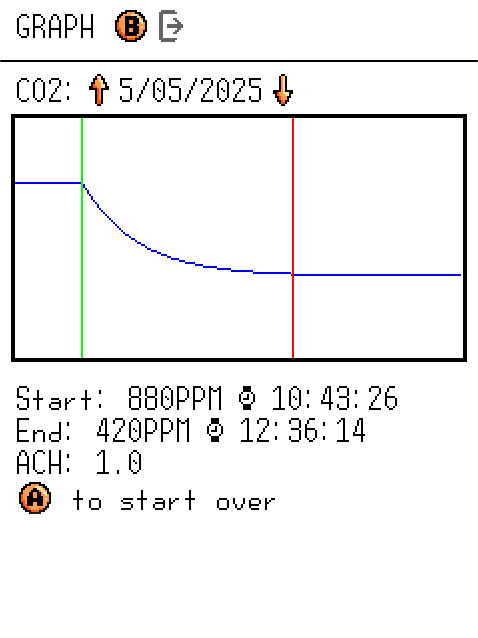
The µCritAir goes beyond simple real-time monitoring by incorporating clever estimation functions for Air Changes per Hour (ACH) and equivalent ACH (eACH), providing deeper insights into your space’s ventilation and air cleaning effectiveness. The ACH estimation leverages natural CO2 fluctuations. Imagine leaving your apartment or office empty after a period of occupancy; the elevated indoor CO2 level will gradually decrease towards the outdoor background concentration (around 420 ppm) as fresh air replaces stale air. On the µCritAir’s data graph, you can use cursors to select the start (high CO2) and end (near background CO2) of this decay period. The device then fits an exponential decay curve to this segment and calculates the rate of fresh air exchange, presenting it as the room’s ACH. Similarly, the eACH function analyzes the removal rate of airborne particles following transient “peak” events like cooking, lighting a candle, vacuuming. Instead of CO2, this function tracks the decay of particle counts – specifically using the raw count of particles smaller than 10 microns (PN10) for better statistical reliability compared to mass-based PM2.5 which can be skewed by single large particles. You again use cursors to define the particle spike and subsequent decay phase on the graph. The µCritAir fits an exponential curve to this decay, estimating the eACH, which represents the total particle removal rate from both ventilation (air exchange) and filtration (like HVAC filters or portable air purifiers).

Conclusion
In conclusion, the µCritAir Development Kit is a genuinely exciting product. It successfully implements the gamification principles I’ve long believed could revolutionize how we approach indoor air quality. While it has the expected rough edges of a Dev Kit, its core concept is sound, the hardware is capable, battery life is strong, and the development team is actively engaged. If you’re an enthusiast excited by the prospect of shaping a novel product and motivated by the charming µCritter, this is a project well worth exploring. It’s a promising glimpse into a future where managing our environment feels less like a chore and more like a game we want to win.
μCritAir is a verified and validated OSHWA (Open Source Hardware Association) air quality monitor that adheres to the community definition of open source hardware. OSHWA UID US002714

Discover more from See The Air
Subscribe to get the latest posts sent to your email.
 See The Air